
Many people think surge protectors and power strips are the same. They look alike, sit on the floor, and let you plug in many devices. But when it comes to safety, these two are very different. Choosing the wrong one can put your electronics, and sometimes your home, at risk. This guide will help you understand the key differences, how each works, and what you need for true protection. You’ll also discover how to pick the right one for your needs and avoid mistakes that most people make.
What Is A Power Strip?
A power strip is a simple device. It takes one wall socket and turns it into several outlets. You often see them behind TVs, under desks, or in the kitchen. Power strips are useful when you have more plugs than sockets.
Most power strips have an on/off switch. Some have basic circuit breakers, but many do not. They do not protect your devices from electrical surges. In other words, if there’s a spike in voltage, your devices can still be damaged.
Example: Imagine plugging your TV, game console, and DVD player into a power strip. You’re not protected if there’s a lightning strike nearby or your utility company has a sudden voltage spike.
What Is A Surge Protector?
A surge protector looks like a power strip but does much more. It not only gives you more outlets but also guards your devices against sudden bursts of electricity—called power surges.
Surge protectors use built-in components, such as metal oxide varistors (MOVs), to absorb extra voltage. When a surge happens, the MOVs take the hit instead of your devices.
Example: If lightning strikes a power line, a surge protector can block or reduce the excess voltage before it reaches your laptop, TV, or phone charger.
Key Differences: Surge Protector Vs Power Strip
People often buy a power strip thinking they’re getting surge protection. This is a common—and risky—mistake. Here’s how these two compare:
| Feature | Power Strip | Surge Protector |
|---|---|---|
| Number of Outlets | 3-12 | 3-12 |
| Surge Protection | No | Yes |
| On/Off Switch | Sometimes | Sometimes |
| Indicator Light | Rare | Common |
| Price Range (USD) | $5-$20 | $15-$100+ |
Non-obvious insight: Just because a device has multiple outlets and a switch does NOT mean it offers surge protection. Always check the packaging or product details.
How Power Surges Happen
Power surges are sudden increases in voltage. They can last less than a second but cause major damage.
Common causes:
- Lightning strikes: Even distant lightning can send a surge through power lines.
- Power grid switching: Utility companies sometimes change power routes, which can create a spike.
- Large appliances: Refrigerators, air conditioners, or elevators turning on and off can cause small surges.
Surprising fact: Most power surges come from inside your home. When motors in appliances start or stop, they can send small surges through your wiring.
Why Surge Protection Matters
Modern electronics are sensitive. Computers, TVs, gaming consoles, and routers have tiny parts that can be destroyed by a surge. Even a small, unnoticed surge can shorten their lifespan.
Data from the Insurance Information Institute: Power surges are responsible for about $1 billion in insured losses every year in the U.S.
Hidden risk: Surge damage is not always obvious. Sometimes, devices work for months after a surge but fail early.
How Surge Protectors Work
A surge protector uses MOVs to absorb extra voltage. When the voltage is normal, MOVs do nothing. When it rises too much, they redirect the excess energy away from your devices.
Most protectors have an indicator light. This shows you that the protection is working. If the light goes out, the device may still work as a power strip, but you lose surge protection.
Practical tip: Replace surge protectors every 2-3 years, or if they have taken a big hit from a surge.
Credit: nps.edu
How To Tell If You Have A Surge Protector
Many people don’t know if their strip offers surge protection. Here’s how to check:
- Look for a label. True surge protectors often say “surge protection” or “protected” on the box or the device.
- Find the rating. Surge protectors list their protection level in joules. If you see “900 joules,” “2000 joules,” etc., it’s a surge protector.
- Indicator light. Most have a light that says “Protected” or similar.
- UL seal. Look for “UL 1449” certification. This shows it meets safety standards for surge protection.
Non-obvious insight: Some cheap strips pretend to be surge protectors but offer little or no real protection. Always check for a joule rating and UL 1449 listing.
How To Choose The Right Surge Protector
Not all surge protectors are equal. Here are the main things to consider:
1. Joule Rating
Joules measure how much energy a surge protector can absorb before it stops working. Higher joules = more protection.
- Basic protection: 200-400 joules (small devices)
- Good protection: 600-1000 joules (TVs, routers)
- Heavy-duty: 1500+ joules (computers, home theaters)
2. Clamping Voltage
This is the voltage level where the protector starts blocking a surge. Lower is better. Look for 330V, 400V, or 500V.
3. Response Time
Surges happen fast. Good protectors react in less than one nanosecond (ns). Slower models may let some surge through.
4. Number And Type Of Outlets
Think about what you need to plug in. Some surge protectors offer USB ports, phone line protection, or coaxial (for TVs).
5. Indicator Lights
Choose a model with clear lights for “Protected” and “Grounded. ” This helps you know when the device is still working.
6. Safety Certifications
Look for UL 1449 on the label. Avoid products that only say “UL Listed” without this specific standard.
7. Warranty And Equipment Coverage
Some surge protectors offer a warranty for connected devices. Check the details, but remember: no protector can guarantee 100% safety.
When Is A Power Strip Good Enough?
A plain power strip is fine for devices that are not sensitive or expensive. Examples:
- Table lamps
- Fans
- Phone chargers (for old phones)
- Small kitchen appliances (toaster, blender)
Never use a plain power strip for computers, TVs, game consoles, or other electronics you can’t afford to lose.
Common Mistakes When Buying Or Using Power Strips And Surge Protectors
Even careful shoppers make mistakes. Here are the most common:
- Using a power strip as a surge protector. This is risky for electronics.
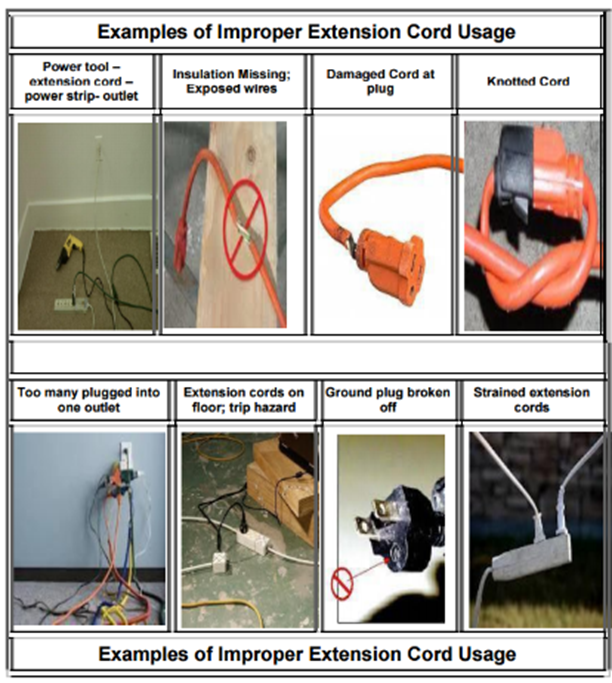
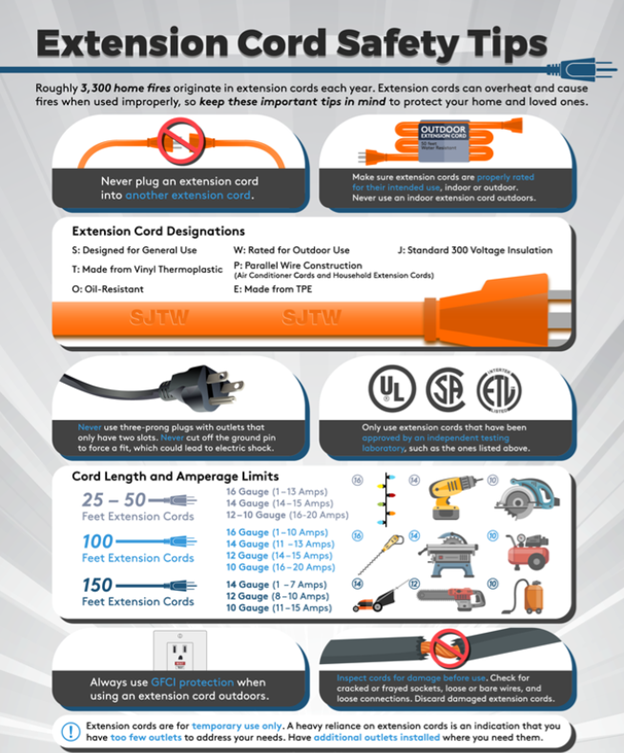
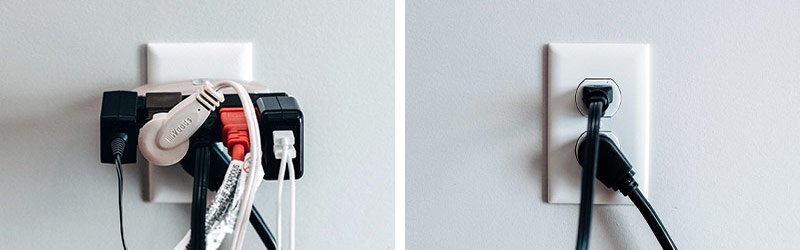
- Overloading. Plugging too many devices can cause overheating or fire.
- Daisy-chaining. Plugging one strip into another is dangerous and can overload circuits.
- Ignoring the indicator light. If the light is out, you have no surge protection.
- Not replacing old protectors. Surge protectors wear out, especially after strong surges.
Credit: nps.edu
Real-world Examples And Data
Case 1: A storm hit a home in Florida. The owner had a $1,500 TV plugged into a surge protector rated at 2000 joules. A nearby lightning strike caused a surge, but the TV survived without damage. The surge protector’s indicator light stopped working, meaning it absorbed the surge and needed replacement.
Case 2: In 2017, a small business lost six computers after plugging them into basic power strips. A power surge from a faulty transformer wiped out all the machines. None had surge protection. The owner spent over $3,000 on replacements.
Stat: According to the National Fire Protection Association, extension cords and power strips cause about 3,300 home fires yearly in the U.S. Overloaded or misused strips are often the reason.
Best Practices For Surge Protector And Power Strip Safety
Follow these guidelines to keep your home and devices safe:
- Match the device to the need. Use surge protectors for sensitive electronics.
- Don’t overload. Add up the wattage of your devices and stay below the strip’s limit.
- Plug directly into the wall. Don’t link strips or protectors together.
- Replace after a big surge. If you know there was a lightning strike or big power event, get a new protector.
- Check indicator lights monthly. No light means no surge protection.
- Keep cords untangled and visible. Hidden cords can overheat and start fires.
- Use wall-mounted options in wet areas. For kitchens and bathrooms, use GFCI outlets with built-in protection.
Advanced: Whole-house Surge Protection
For even more safety, some homeowners install whole-house surge protectors at their electrical panel. These block most surges before they reach outlets. They work well with plug-in protectors for full coverage.
Note: This requires a licensed electrician. It’s a smart investment if you have expensive electronics or live in an area with frequent storms.
For more on electrical safety and surge protection, see this NFPA resource.
Quick Comparison: Surge Protector Vs Power Strip At A Glance
Here’s a summary to help you choose the right device:
| Use Case | Best Choice | Why |
|---|---|---|
| Computer, TV, Gaming Console | Surge Protector | Protects from surges, extends device life |
| Lamp, Fan, Non-electronic Devices | Power Strip | Adds more outlets, no surge risk |
| Home Theater System | Surge Protector (1500+ joules) | Handles large surges, multiple devices |
| Kitchen Appliances | Power Strip (if small) | Convenience only, not for surge protection |
Credit: www.midamericanenergy.com
Frequently Asked Questions
What Is The Main Difference Between A Surge Protector And A Power Strip?
The main difference is that a surge protector guards your devices against voltage spikes, while a power strip only gives you more outlets with no added protection.
How Do I Know If My Power Strip Is Also A Surge Protector?
Check for a joule rating, an indicator light, and UL 1449 certification. If these are missing, it’s probably just a power strip.
Can I Plug A Surge Protector Into Another Surge Protector Or Power Strip?
No. This is called daisy-chaining and is unsafe. It can overload your wiring and may void any warranty or protection.
How Long Do Surge Protectors Last?
Surge protectors lose their ability to protect after a few years or after taking a major surge. Replace them every 2-3 years or if the protected light goes out.
Is Surge Protection Needed For Phone Chargers And Small Devices?
Usually, no. Basic phone chargers and lamps do not need surge protection. But for laptops, tablets, or any expensive electronics, surge protection is a smart choice.
Choosing between a surge protector and a power strip is more than just picking the cheapest or most convenient option. It’s about protecting your electronics and your home. Use surge protectors for anything valuable or sensitive. Keep power strips for simple tasks.
Check your devices today—your future self will thank you.
