
A neat workspace helps you feel calm, work faster, and reduce stress. But if you look behind most desks, you will often see a mess of tangled cables. This mess not only looks bad but also makes it harder to clean, increases the risk of tripping, and can even damage your electronics if cords get yanked.
If you want to organize your desk and keep cables under control, there are smart ways to bundle cables neatly behind your desk. With the right tools, a little planning, and some easy steps, anyone can turn cable chaos into a clean, organized system.
Let’s explore the best methods, tools, and habits to keep your cables tidy, safe, and almost invisible.
Why You Should Organize Cables Behind Your Desk
Keeping cables neat is not just about looks. There are real benefits to a well-managed cable setup:
- Safety: Tangled cords can cause people to trip or get caught, leading to accidents.
- Device Protection: Neat cables are less likely to get pulled, bent, or damaged. This helps your devices last longer.
- Easier Cleaning: Dust and dirt collect less when cables are out of the way.
- Better Airflow: Electronics can get hot if cables block fans and vents.
- Faster Troubleshooting: If something stops working, you can quickly find the right cable.
Planning Your Cable Management
Before you start bundling cables, take a few minutes to plan. Good planning saves time and frustration later.
Identify All Cables
Unplug everything and lay out each cable. Label each one if possible, or make a quick list. You’ll often find cables you no longer use.
Decide Where Devices Will Go
Arrange your devices—monitors, speakers, chargers—on your desk. This will show you where cables need to run and how long they should be.
Measure Cable Lengths
Cables that are too long make a mess. Short cables are stretched and can break. Measure the distance from your device to the nearest outlet or port, then add a little extra for slack.

Credit: desky.com
Essential Tools For Bundling Cables
Several tools make cable management much easier and more secure. Here are the most helpful ones:
| Tool | Main Use | Best For |
|---|---|---|
| Velcro Straps | Reusable bundling | Frequent changes |
| Cable Ties (Zip Ties) | Permanent bundling | Long-term setups |
| Cable Sleeves | Hiding multiple cables | Thick bundles |
| Cable Clips | Attaching to surfaces | Desks, walls |
| Adhesive Cable Holders | Holding single cables | Charging cables |
| Cable Boxes | Hiding power strips | Floor or desk |
Step-by-step Guide: How To Bundle Cables Neatly
Tidy cable management is easier if you follow these simple steps. Each one builds on the last to create a clean and safe setup.
1. Unplug And Sort
Start by unplugging all devices. Lay out every cable and remove ones you don’t use. This is a good time to dust or wipe down your desk.
2. Label Every Cable
Use simple labels, masking tape, or store-bought tags. Mark each end of the cable with its purpose, such as “Monitor” or “Phone Charger. ” This helps you reconnect everything quickly and prevents confusion later.
3. Group Cables By Function
Put similar cables together. For example, group all computer cables, all phone chargers, and all audio cables. This makes them easier to bundle and hide.
4. Choose The Right Bundling Tool
If you often move things around, use Velcro straps. For more permanent setups, zip ties are strong and secure. To hide several cables together, a cable sleeve gives a cleaner look.
5. Bundle Cables Together
Wrap cables loosely so you don’t damage them. If you use zip ties, do not pull too tight—this can cut into the cable and cause problems later. For cables that need to stay flexible, Velcro straps are better.
6. Attach Bundles To The Desk
Use cable clips or adhesive holders to fix your cable bundles to the back or underside of the desk. Space the clips every 30–40 cm (about a foot) to keep cables from sagging.
7. Hide Power Strips
A cable management box can hide power strips and adapters. Place the box on the floor or mount it under the desk for a cleaner look. Some boxes even have space for extra cable slack.
8. Coil Excess Length
If a cable is too long, coil the extra length and secure it with a Velcro strap. Never force cables into tight loops; gentle coils protect the wire inside.
9. Keep Charging Cables Accessible
Use adhesive cable clips on the edge of your desk to hold charging cables. This keeps them close but prevents them from falling to the floor.
10. Double-check Device Connections
Once everything is bundled, plug devices back in. Make sure all cables reach without stretching. Adjust if needed, and check that nothing is pinched or bent sharply.
11. Review And Adjust
Sit at your desk and move around as you normally would. Make sure cables stay in place and nothing gets in your way. Adjust clips or bundles if needed.
Best Practices For Ongoing Cable Management
Bundling cables neatly behind your desk is not a one-time job. It’s a habit you build for a cleaner, safer workspace.
- Check every few months: Cables can shift, especially if you move devices or clean your desk.
- Update your labels: When you add or remove equipment, keep your labels up to date.
- Leave some slack: Don’t pull cables too tight. Leave a little extra length so nothing gets damaged when you move your desk.
- Use color coding: Velcro straps and cable labels come in different colors. Use these to group cables by device or function.
- Avoid mixing power and data cables: Keeping these separate can reduce signal problems and overheating.
How Different Cable Bundling Tools Compare
Choosing the right tool can make a big difference. Here is a quick comparison of popular options.
| Tool | Reusable | Best Use | Price Range |
|---|---|---|---|
| Velcro Straps | Yes | Temporary setups | Low |
| Zip Ties | No | Permanent setups | Very Low |
| Cable Sleeves | Yes | Hiding thick bundles | Medium |
| Adhesive Clips | Sometimes | Holding cables to surfaces | Low |
| Cable Boxes | Yes | Hiding power strips | Medium |
Common Mistakes To Avoid
Many people try to hide cables but make simple mistakes that cause problems later. Here are some to watch out for:
- Pulling cables too tight: This can cause cables to break or lose signal quality.
- Bundling power and data cables together: This sometimes leads to interference or overheating.
- Ignoring labels: Without labels, you might unplug the wrong thing.
- Forgetting about airflow: Blocking vents or fans with cables can make your devices overheat.
- Overusing zip ties: These are hard to remove and can damage cables if pulled too tight.
- Not planning for changes: Make your setup flexible so you can add or remove devices easily.
Real-world Example: Transforming A Messy Desk
Let’s look at a simple example. Mark had a desk with a computer, two monitors, speakers, a lamp, and several chargers. Cables hung everywhere, and he often pulled the wrong plug. After one evening of cable management:
- Mark unplugged and sorted his cables, removing three he no longer needed.
- He labeled every cable with its device name.
- Using Velcro straps, he bundled cables by device group.
- He attached the main bundles to the back of his desk with cable clips.
- Excess cable was coiled and secured under the desk.
- He used a cable management box to hide the power strip.
- Charging cables were clipped to the desk edge for easy access.
The result: Mark’s floor was clear, his desk was easier to clean, and he could add new devices without making a mess.

Credit: www.autonomous.ai
How To Hide Cables For A Minimal Look
If you want your desk to look as clean as possible, try these extra steps:
- Use wireless devices where possible (mouse, keyboard, printer).
- Mount a power strip under the desk, not on the floor.
- Drill a small hole (grommet) in your desk for cables to pass through.
- Paint cable sleeves or use covers that match your desk color.
- Use cable raceways to run cables along the wall and keep them hidden.
How Cable Management Can Improve Productivity
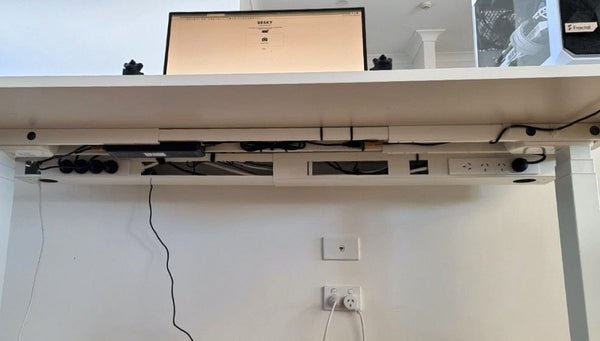
A clean workspace affects more than just looks. Studies show that people with organized workspaces are up to 20% more productive and feel less stressed. You will spend less time searching for cables or worrying about unplugging the wrong device. An organized desk also sends a signal of professionalism, whether you work from home or in an office.
Credit: desky.com
Environmental Benefits Of Good Cable Management
Organizing cables does not just help you—it can help the planet. When cables are well-managed, they last longer and are less likely to get thrown out. You can also spot unused or broken cables easily and recycle them. According to the Environmental Protection Agency, millions of tons of electronic waste are produced each year, much of it from small items like cables.
Additional Tips For Special Setups
- Standing desks: Use flexible cable sleeves that move up and down with the desk.
- Gaming setups: Use color-coded cable ties to group cables for easy changes.
- Offices with many users: Create a cable map or chart so everyone knows which cable goes where.
For more cable management inspiration, visit PCMag’s guide.
Frequently Asked Questions
How Often Should I Check My Cable Setup?
It’s best to check your cables every 2–3 months, especially if you often move devices or clean your workspace. Regular checks help prevent tangling and damage.
What Is The Safest Way To Bundle Power Cables?
Use Velcro straps or cable sleeves. Avoid bundling power cables too tightly or mixing them with data cables, as this can cause interference or overheating.
Can I Use Household Items For Cable Management?
Yes! Items like twist ties, bread clips, and even binder clips can help in a pinch. However, purpose-made cable management tools are safer and usually last longer.
How Do I Hide Cables If My Desk Is Against A Wall?
Use cable raceways or adhesive clips to run cables along the back of your desk or wall. A cable management box can hide power strips and adapters neatly.
What If I Need To Add New Devices Later?
Plan your cable bundles to be flexible. Use Velcro straps instead of zip ties and leave some slack in your cables. Always keep extra labels handy for new cords.
Bundling cables neatly behind your desk takes a little time but pays off with a cleaner, safer, and more professional workspace. With the right tools and habits, you can keep cable clutter under control for good.