
Many people spend hours working at a desk each day, but few stop to think about how their workspace setup affects their body. If you often feel neck or back pain, headaches, or tired eyes after a day at the computer, your desk layout might be to blame. One simple, often overlooked tool can make a big difference: the document holder for desk. While it may look like a basic accessory, using a document holder can offer real ergonomic benefits—helping you work more comfortably, avoid injury, and stay focused for longer.
In this article, you’ll learn exactly what a document holder is, how it improves your posture and health, and why it’s worth considering if you care about your well-being at work. We’ll cover the science behind its benefits, help you compare types, and give you practical tips for choosing and using the right document holder for your needs.
What Is A Document Holder For Desk?
A document holder for desk is a stand or platform that holds papers, books, or notes upright next to your computer screen. Instead of laying your documents flat on the desk, you place them on the holder at an angle that makes reading easy. Some holders sit between your keyboard and monitor, while others clip to the side of your screen. Advanced models can even adjust in height, tilt, or angle.
People who handle paperwork, data entry, translation, or research often switch their attention back and forth between papers and their computer. Without a document holder, this means constantly looking down or sideways, twisting your neck, and straining your eyes. Over time, these small movements add up and can cause discomfort or even long-term injury.
Key Ergonomic Benefits Of Using A Document Holder
1. Reduces Neck And Back Strain
When documents are flat on your desk, you have to bend your neck to read them. This small movement, repeated hundreds of times a day, leads to muscle tension and pain. Placing papers at eye level helps keep your head and neck in a neutral position. Studies show that even a 15-degree tilt can reduce neck flexion by up to 60%. Less bending means less pain and a lower risk of chronic neck or upper back problems.
2. Improves Overall Posture
A well-placed document holder encourages you to sit upright. Your spine stays aligned, reducing the chance of slouching or leaning forward. Good posture not only prevents pain but also helps you breathe better and feel more alert. Even small changes, like raising your documents to the right height, can make a noticeable difference in your comfort by the end of the day.
3. Reduces Eye Strain And Fatigue
Switching your focus from a flat desk to a vertical monitor makes your eyes work harder. A document holder keeps both your screen and papers in the same line of sight. This minimizes how much your eyes need to adjust, reducing eye fatigue and dry eyes. Some users report fewer headaches and better concentration when using a document holder.
4. Boosts Work Speed And Accuracy
Having documents at the right angle and in clear view makes it easier to type, copy, or refer to information. You waste less time moving your head or searching for your place on the page. For jobs that require frequent referencing—like data entry, translation, or coding—this can mean fewer errors and faster work.
5. Supports Multi-tasking And Organization
Some document holders offer space for multiple pages, sticky notes, or books. This helps you keep your workspace tidy and your documents organized. You can quickly switch between tasks without shuffling papers, which is especially useful for students, researchers, or anyone who works with many sources at once.
Types Of Document Holders For Desk
Choosing the right document holder depends on your work style, desk setup, and the types of documents you use. Here’s a look at the main categories:
| Type | Best For | Key Features |
|---|---|---|
| Freestanding Holders | General office tasks, students | Portable, adjustable angle, often with page clips |
| Inline (Between Keyboard & Monitor) | Data entry, transcription | Keeps documents centered, reduces neck movement |
| Side-Mounted Holders | Limited desk space | Clips to monitor, saves space, usually holds fewer pages |
| Vertical Book Stands | Books, manuals, thick documents | Strong support, can hold heavy items |
| Copyholders with Magnifier | Detailed reading, elderly users | Integrated magnifying glass for small text |
Non-obvious insight: Some people with dual monitors find it helpful to use a document holder between the screens, so their reference material is always in central view. This setup can further reduce neck twisting.
How To Set Up A Document Holder Ergonomically
A document holder only delivers its full benefits if you set it up correctly. Poor placement can actually make things worse. Here’s how to get it right:
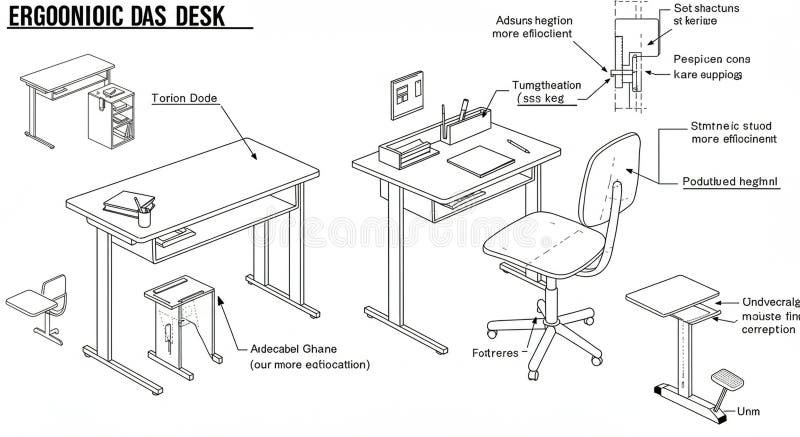
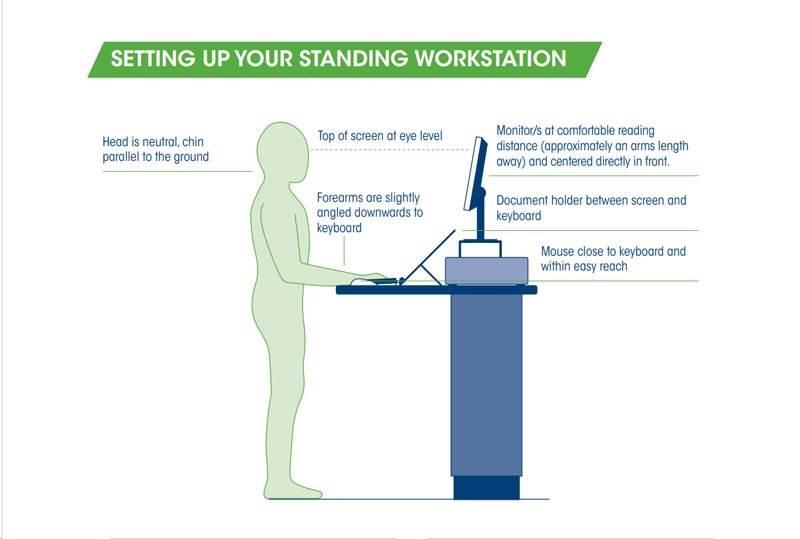
- Align with monitor height: Place the top of the document holder at the same height as your monitor, or slightly below. This keeps your gaze level.
- Center if possible: If you type from documents often, the best position is directly between your keyboard and monitor.
- Angle adjustment: Tilt the holder to match your natural viewing angle—usually between 30 to 45 degrees.
- Distance: Keep the holder about an arm’s length away, just like your monitor. This prevents eye strain from shifting focus.
- Lighting: Make sure there’s enough light on your documents to avoid squinting. Use a desk lamp if needed.
Practical tip: If your document holder slides or moves easily, use a non-slip mat underneath. This simple fix keeps your setup stable.
Credit: www.dreamstime.com
Comparing Document Holders: Material, Size, And Features
When shopping for a document holder, it’s easy to focus only on price or appearance. However, the right features make a real difference in comfort and usability. Here’s a comparison of popular options:
| Material | Durability | Weight | Adjustability | Common Uses |
|---|---|---|---|---|
| Plastic | Moderate | Light | Often adjustable | Everyday office work |
| Metal | High | Heavier | Very sturdy, some models fully adjustable | Large books, thick files |
| Wood | High | Medium | Classic look, sometimes less adjustable | Home offices, aesthetic setups |
| Acrylic | Moderate | Light-medium | Clear, blends with any décor | Modern offices, design-focused spaces |
Another common mistake is choosing a document holder that’s too small for your usual paperwork. Always check the maximum page size and weight the holder can handle. If you often use large books or thick files, a sturdy metal or wooden stand is usually best.
Real-world Example: How A Document Holder Prevents Injury
A 2020 study by the Occupational Health & Safety Journal found that office workers who used a properly placed document holder reported 37% less neck pain and 24% fewer headaches after just four weeks. This benefit was even higher for people who spend more than five hours per day referencing paperwork.
Here’s how a typical day changes with a document holder:
- Before: Maria, a translator, read documents flat on her desk. She looked down more than 100 times a day, leading to daily neck pain.
- After: By adding an inline document holder between her keyboard and monitor, Maria’s neck stayed level. She felt less tired, made fewer mistakes, and her pain faded after two weeks.
Tips For Choosing The Right Document Holder
- Check adjustability: Look for holders with multiple angles or height settings. Your needs may change during the day.
- Consider space: If your desk is small, a side-mounted or compact stand may fit better.
- Weight matters: Heavier holders are more stable but harder to move. Lightweight models are easier to store but may shift around.
- Think about capacity: If you use thick books or binders, make sure the holder can support them.
- Test before buying: If possible, try placing your usual documents on the holder to see if the size and angle feel right.
Non-obvious insight: Some advanced holders include a built-in ruler, dry-erase board, or pen tray. These extras can improve your workflow if you often annotate or switch between documents.
Common Mistakes When Using A Document Holder
Even with the best equipment, mistakes can reduce the benefits of a document holder. Watch out for these pitfalls:
- Placing the holder too far left or right, causing neck twisting
- Setting the angle too steep or too flat, making reading hard
- Using a holder that’s too small for your documents
- Ignoring lighting, leading to eye strain
- Not adjusting the setup as your needs change
If you share a workspace, remember to reset the holder’s position each time you sit down.
Credit: www.osha.gov
When Should You Consider A Document Holder?
Anyone who spends an hour or more each day reading from paper while at a computer can benefit. Some specific examples:
- Students: For essay writing, studying from textbooks, or typing notes
- Accountants: Data entry from invoices or receipts
- Writers and editors: Checking drafts or references
- Medical professionals: Reviewing charts while updating records
- Lawyers: Comparing legal documents and typing summaries
Even if you don’t work with paper daily, a document holder can help during special projects or exam periods.
Do Document Holders Work With Laptops And Tablets?
While most document holders are designed for desktop monitors, many models now work well with laptops or even tablets. Look for stands that can sit beside your portable device or clip onto the laptop screen. Some modern holders even have flexible arms to position your documents in the best spot.
Practical tip: If you use a laptop on a riser, an adjustable document holder is especially important. This setup helps keep all your materials at the same height, reducing strain.
Long-term Ergonomic Benefits
Small daily improvements add up over weeks and months. Using a document holder as part of a good ergonomic desk setup can:
- Lower your risk of repetitive strain injury (RSI)
- Prevent headaches, eye strain, and neck pain
- Help you focus longer and feel less tired after work
- Reduce the chance of needing medical treatment for posture problems
For more detailed guidance on ergonomics, the Occupational Safety and Health Administration (OSHA) offers helpful resources.
Frequently Asked Questions
What’s The Ideal Position For A Document Holder On My Desk?
The best position is usually directly between your keyboard and monitor, at the same height as your screen. This keeps your head and neck straight and reduces twisting. If that’s not possible, place it as close to your main line of sight as you can.
Can A Document Holder Help With Eye Strain?
Yes. By keeping your documents at the same viewing distance and angle as your monitor, your eyes don’t have to constantly refocus. This reduces fatigue and can even help prevent dry eyes or headaches.
Are Document Holders Suitable For Left-handed Users?
Most are designed to be ambidextrous, but side-mounted holders may be specific for left or right. Look for models that allow you to switch sides or adjust the angle for your comfort.
Do I Need A Special Type For Books Or Thick Binders?
If you often use heavy books, choose a stronger holder—often made from metal or wood—designed for higher weight. Look for features like deep grooves, sturdy page clips, or even adjustable arms to keep the book open.
Is A Document Holder Necessary If I Only Use Digital Documents?
If you rarely use paper, you may not need one daily. But for occasional projects, exams, or reviewing printed reports, a document holder can still reduce strain and improve comfort. Some people also use holders for tablets, e-readers, or even smartphones.
A small change like adding a document holder to your desk can make a big impact on your comfort, health, and productivity. By choosing the right model and setting it up thoughtfully, you’ll not only work better but also take care of your body—one page at a time.
Credit: www.laborkreis.de