
Keeping your desk clean is harder than it looks, especially with so many cables for chargers, monitors, and other devices. If you’ve ever felt annoyed by tangled wires or struggled to find the right cord, you’re not alone. A tidy workspace isn’t just about looks—it can also boost your focus and make work less stressful. Two of the most popular solutions are the desk cable tidy tray and the cable management box. But which one is better for your needs? Let’s dive deep into both options, compare their pros and cons, and help you make a smart choice for your workspace.
What Is A Desk Cable Tidy Tray?
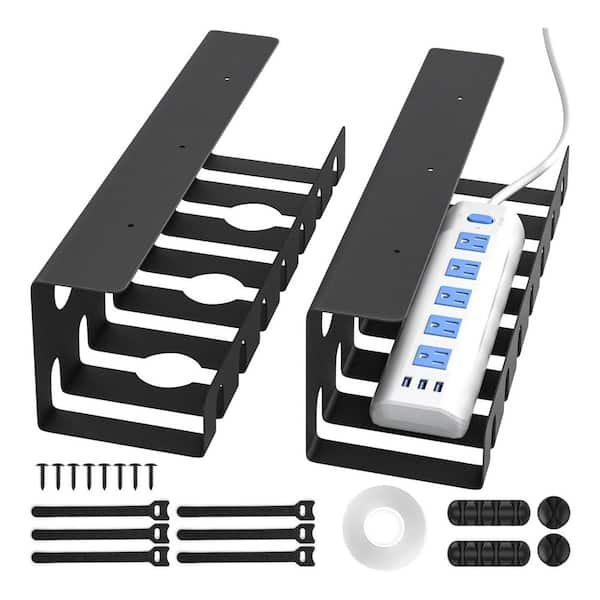
A desk cable tidy tray is a simple holder that attaches under or behind your desk. It’s usually made from metal or sturdy plastic, and its main job is to keep your cables off the floor and out of sight. Most trays look like a long basket or shelf with open sides, so you can easily put in or remove cables. Some are designed to hold power strips, while others are just for cables.
One big advantage of tidy trays is that they are out of view. This means your desk looks neat, and cleaning under it is much easier. You can mount a tray in different ways: with screws, clamps, or even adhesive strips. Good trays let you run cables through any side, so you can arrange wires however you like.
People often use trays in offices or home workspaces where there are multiple devices—laptops, monitors, phones, and chargers. They work well for both sitting and standing desks. If your main goal is to keep everything off the floor and tucked away, a tidy tray is a strong option.
What Is A Cable Management Box?
A cable management box is like a small storage container for power strips and extra cable length. Most boxes sit on the floor, on a shelf, or even on top of a desk. They usually have a lid and openings on each side for cables to pass through. The main purpose is to hide messy cords and power strips, making everything look more organized.
Cable boxes are often made from plastic, but you can also find wooden or metal versions. Some have extra features like non-slip feet or fire-resistant material. A big plus is that they keep plugs, adapters, and wires out of sight, which is safer if you have kids or pets.
These boxes work best in places where you have several devices plugged into a power strip. Instead of seeing a mess of cords, you just see a clean box with a few wires coming out. For anyone who wants a simple way to hide cable clutter, a cable management box is very effective.
Desk Cable Tidy Tray Vs Box: Side-by-side Comparison
To make things clear, here’s a direct comparison using key factors that matter to most people:
| Feature | Desk Cable Tidy Tray | Cable Management Box |
|---|---|---|
| Installation | Requires mounting under/behind desk | No installation—just place it |
| Visibility | Hidden from view under desk | Visible unless hidden behind furniture |
| Capacity | Best for long cables and power strips | Best for power strips and cable bundles |
| Accessibility | Easy to add/remove cables | Need to open lid for changes |
| Safety | Keeps cables off the floor | Reduces trip hazards, blocks access from pets/kids |
| Cost | Usually $15–$40 | Usually $10–$35 |
From the table, you can see that both solutions have unique advantages. But the best choice depends on your own workspace and what you care about most.
Practical Benefits Of Each Option
Why Choose A Desk Cable Tidy Tray?
- Keeps Floor Clear: No more stepping on wires or tripping over power cords. This is especially helpful if you use a standing desk or have a robot vacuum.
- Customizable: You can cut cable lengths to fit your tray, add zip ties, or even attach extra hooks for headphones.
- Professional Look: Offices often use trays to create a clean, “wireless” look. This can impress visitors and help you feel more organized.
- Easy Cleaning: Dust and dirt collect less under your desk when cables are off the ground.
Non-obvious insight: Many people don’t realize that tidy trays can also improve airflow to power strips, which can reduce overheating risk over long periods.
Why Choose A Cable Management Box?
- Simple Setup: You just place the box where you need it—no screws, tools, or measuring.
- Safety: Hides electrical outlets from curious pets and small children. This reduces the chance of accidental unplugging or chewing.
- Handles Large Power Bricks: Big adapters and plugs fit inside, so you don’t have to see them.
- Portability: If you move your setup, just pick up the box and place it somewhere else.
Non-obvious insight: A cable box can also help with noise reduction. Power bricks sometimes hum or buzz, and the box muffles these sounds.

Credit: www.humanscale.com
Installation: What To Expect
Desk Cable Tidy Tray
Installing a tidy tray takes a little planning. You’ll need a screwdriver or drill for most models. Some trays use clamps that tighten to your desk edge, which is easier but may not work on very thin or thick desks.
The steps usually look like this:
- Decide where you want the tray (centered or to one side).
- Mark the screw holes.
- Attach the tray using screws, clamps, or adhesive strips.
- Place cables and power strips inside, using zip ties for extra neatness.
Most people can install a tidy tray in 15–30 minutes. If you’re worried about damaging your desk, look for clamp-on or adhesive options.
Cable Management Box
Setup is almost instant:
- Open the lid.
- Place your power strip and extra cable inside.
- Run cables through the side slots.
- Close the lid.
You can move the box whenever you like, and it works on any surface. Some boxes even have anti-slip pads so they don’t slide around.
Flexibility And Adaptability
| Aspect | Tidy Tray | Cable Box |
|---|---|---|
| Desk Compatibility | Needs space under desk | Works anywhere |
| Temporary Setups | Not ideal (needs mounting) | Perfect for temporary use |
| Device Changes | Easy to swap or add cables | Must open box to adjust |
If you change your setup often, the cable box is more flexible. If you want a permanent, invisible solution, the tidy tray is better.
Design And Aesthetics
Most cable tidy trays are simple—black or white metal, sometimes with mesh sides. They are hidden, so style isn’t a big concern. Some brands offer matching cable clips or accessories.
Cable boxes are more visible, so there are more design options. Some look like wood, others are bright colors, and some have soft edges for a modern look. If you care about room style, you’ll find more choices with boxes.
Safety And Fire Considerations
Both trays and boxes help make your space safer, but in different ways.
- Cable tidy trays keep cords off the floor, so there’s less chance of tripping. This is important in busy offices or homes with kids.
- Cable management boxes cover power strips completely. This protects against accidental splashes and blocks access for pets or children.
Fire safety tip: Always check for ventilation. Power strips and adapters can get hot. Tidy trays are open for airflow, but not all cable boxes have vents. Choose a box with enough holes or slots to prevent overheating.
According to a study by the U.S. Consumer Product Safety Commission, overheating of power strips is a common cause of electrical fires. Never overload your cables or use closed boxes for high-power devices.

Credit: www.btod.com
Maintenance And Cleaning
With a tidy tray, cleaning is easy. You can vacuum or sweep under your desk without worrying about hitting wires. Dust can build up in the tray, so wipe it with a dry cloth every few weeks.
Cable boxes need more attention. Dust can get inside, and if you spill water nearby, check the box for moisture. It’s a good idea to open the box and clean inside every month.
Cost And Value
In most markets, both trays and boxes are affordable. Tidy trays range from $15 to $40, depending on size and material. Cable boxes are $10 to $35. High-end models or designer boxes may cost more.
If you want to save money, look for multi-packs or bundles. Some brands offer trays with cable ties and clips included.
Value tip: Cheap boxes or trays may break or sag under heavy loads. Investing a little more up front can save you time and frustration later.
Mistakes People Make When Choosing
- Ignoring desk type: Not all trays fit all desks. Measure the under-desk space before buying.
- Choosing the wrong size: A tray or box that’s too small won’t fit your power strip or all your cables.
- Forgetting ventilation: Closed boxes need enough slots for heat to escape.
- Not thinking about future devices: Leave extra space for new gadgets or cables.
- Buying on looks alone: Function should come first. A stylish box that doesn’t fit your power strip is a waste.
Real-world Examples
- Home office: A writer uses a tidy tray under her sit-stand desk to hold three power strips and six device cables. Her floor is clear, and switching equipment is easy.
- Family room: Parents use a cable management box to hide a large power strip for the TV, gaming console, and speakers. The box keeps everything out of reach from their toddler and dog.
- Co-working space: Each desk has a tidy tray for laptop and monitor cables, giving the whole room a uniform, professional look.
Which Should You Choose?
If you want a permanent, hidden solution and don’t mind a little installation work, go for a desk cable tidy tray. It’s best if you want your desk area clear, and you don’t plan to move things often.
If you need a quick, flexible fix—especially for power strips and large adapters—pick a cable management box. It’s also better if you care about safety for pets or children, or if you change setups a lot.
Some people use both: a tray for long cables and a box for power strips. Mixing solutions can give you the cleanest and safest setup.
For more on workspace safety and cable management, see the OSHA guide to cable management.
Frequently Asked Questions
What Size Cable Tidy Tray Or Box Should I Get?
Measure your power strip and the number of cables you have. Pick a tray or box that is at least 20% bigger than your current needs to allow for future devices. For most desks, a tray about 16–24 inches long fits well.
Can I Use Both A Tidy Tray And A Cable Box Together?
Yes! Many people use a tidy tray under the desk for loose cables, and a cable box on the floor for power strips. This gives you the neatest, safest result.
Are Cable Management Boxes Safe For All Power Strips?
Most are safe, but always check for ventilation. If your power strip gets warm, choose a box with slots or holes for airflow. Never overload the strip.
Do Tidy Trays Damage Desks?
Most trays use small screws or clamps. Screws can leave small holes, but clamps usually don’t cause damage. Adhesive trays are also an option if you want to avoid marks.
How Do I Keep Cables From Slipping Out Of A Tidy Tray?
Use zip ties, Velcro straps, or included clips to bundle cables. This keeps them in place and makes everything look even neater.
A clean desk isn’t just about looks—it’s about feeling in control and working better. Whether you pick a tray, a box, or both, good cable management is a simple upgrade with big benefits.
Credit: www.homedepot.com