
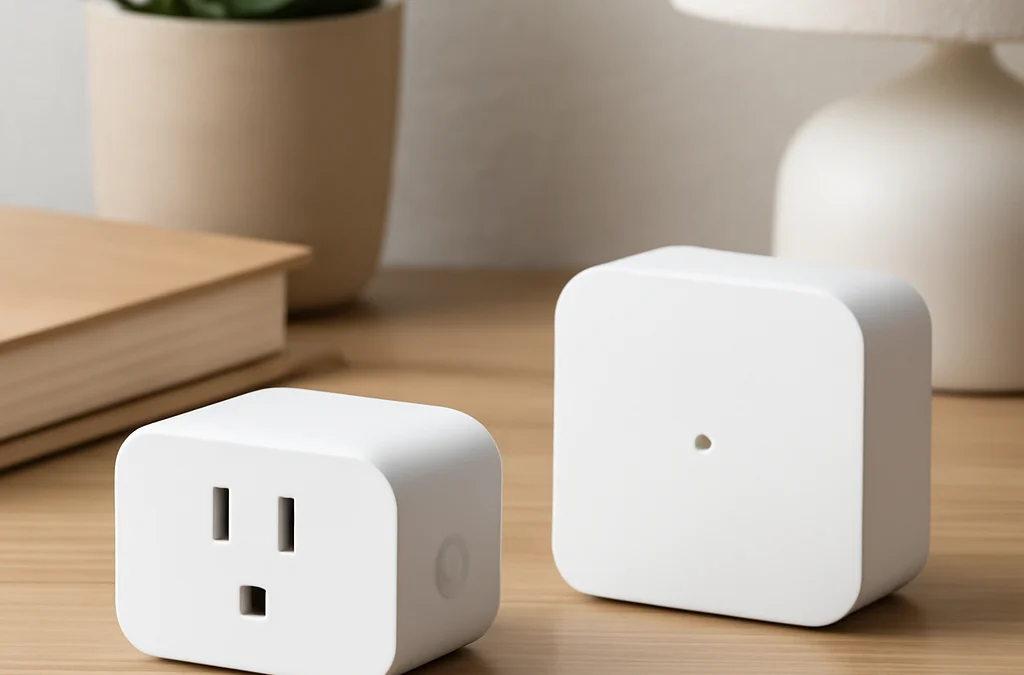
A wifi smart plug that works without a hub connects directly to your home’s existing Wi-Fi network, allowing you to control devices remotely via a smartphone app without needing a separate bridge or central controller. This direct connection simplifies setup and often reduces initial investment, making smart home automation more accessible for many users.
- Directly connects to existing Wi-Fi, no hub required.
- Offers remote control via smartphone apps.
- Simplifies smart home setup and expansion.
- Provides scheduling, energy monitoring, and voice control.
- Ideal for beginners and expanding smart home systems.
Understanding Smart Plugs: Hub vs. Hub-Free
Smart plugs are devices that turn any traditional electrical outlet into a smart, controllable one. They allow you to remotely switch appliances on or off, set schedules, and even monitor energy consumption. The primary distinction among smart plugs lies in their connectivity method: some require a central hub, while others operate independently.
Hub-based smart plugs typically use protocols like Zigbee or Z-Wave. These protocols create a mesh network, which can offer greater range and reliability for large smart home systems. However, they necessitate a dedicated hub, which acts as a translator between the smart devices and your home’s Wi-Fi network. This adds an extra piece of hardware and an additional setup step.
Conversely, a wifi smart plug that works without hub connects directly to your home’s 2.4 GHz Wi-Fi network. These devices bypass the need for a separate hub, communicating straight with your router. This direct approach streamlines installation and reduces clutter, making them a popular choice for those seeking simplicity and ease of use.
The Role of a Hub in Smart Home Systems
A hub serves as the brain of a smart home system, coordinating communication between various devices that might use different wireless protocols. For instance, a hub can allow a Zigbee light bulb to communicate with a Z-Wave door sensor and be controlled via a single app. While powerful for complex setups, a hub can be an unnecessary complication for users who only need to automate a few devices.
Why Hub-Free is Gaining Popularity
The rise of hub-free smart plugs reflects a growing demand for simpler, more accessible smart home technology. Users appreciate the plug-and-play nature, the ability to start small, and the absence of an additional device to purchase and maintain. This direct Wi-Fi connection makes smart plugs an excellent entry point into home automation.
Benefits of a Wifi Smart Plug That Works Without Hub
Choosing a smart plug that operates independently offers several compelling advantages, particularly for those new to smart home technology or looking to expand an existing setup without added complexity.
- Simplified Setup: The most significant benefit is the ease of installation. Without a hub, you simply plug the device into an outlet, connect it to your Wi-Fi network via an app, and you’re ready to go. This eliminates the need for extra wiring or configuration of a central controller.
- Reduced Costs: Eliminating the need for a separate hub means a lower initial investment. You only purchase the smart plugs you need, making it a more budget-friendly way to automate your home.
- Less Clutter: A hub-free system means one less device taking up space and an electrical outlet near your router. This contributes to a cleaner, more minimalist smart home environment.
- Scalability: You can start with just one smart plug and gradually add more as your needs evolve. Each new plug integrates directly into your existing Wi-Fi network, offering flexible expansion without being tied to a specific hub’s capacity or compatibility.
- Direct Control: Control your devices directly from your smartphone app, even when you’re away from home. This direct line of communication ensures reliable remote access without relying on a central hub’s operational status.
- Broad Compatibility: Many hub-free smart plugs are designed to integrate seamlessly with popular voice assistants and smart home ecosystems, offering versatile control options.
How a Wifi Smart Plug That Works Without Hub Operates
Understanding the operational mechanics of a hub-free smart plug reveals its simplicity and effectiveness. These devices leverage your existing home network infrastructure to provide smart control.
When you plug in a hub-free smart plug, it broadcasts a temporary Wi-Fi signal, allowing your smartphone to connect to it directly during the initial setup. Through the manufacturer’s dedicated app, you provide the smart plug with your home Wi-Fi network’s credentials (SSID and password). Once configured, the smart plug disconnects from your phone’s direct connection and joins your home’s 2.4 GHz Wi-Fi network.
From this point onward, the smart plug communicates with the manufacturer’s cloud servers via your home Wi-Fi and internet connection. When you issue a command through the app on your smartphone, the command travels from your phone to the cloud server, then back down to your smart plug through your home’s internet connection. This cloud-based communication enables remote control from anywhere with an internet connection.
The Role of the 2.4 GHz Band
Most hub-free smart plugs operate exclusively on the 2.4 GHz Wi-Fi band. This band offers a wider range and better penetration through walls compared to the 5 GHz band, which is crucial for devices that might be located further from your router. While 2.4 GHz is slower than 5 GHz, the data requirements for smart plugs (simple on/off commands, schedule updates) are minimal, making it perfectly suitable.
App-Based Control
The core of controlling a hub-free smart plug is its dedicated smartphone application. These apps typically offer a range of features:
- Remote On/Off: Instantly switch connected devices.
- Scheduling: Set specific times for devices to turn on or off.
- Timers: Create countdown timers for temporary operation.
- Energy Monitoring: Track power consumption of connected appliances (if supported).
- Scene Creation: Group multiple smart devices to activate with a single command.
- Away Mode: Randomly turn lights on and off to simulate occupancy.
Key Features to Look for in Standalone Smart Plugs
When selecting a wifi smart plug that works without hub, several features can enhance its utility and integration into your smart home. Prioritizing these aspects ensures you choose a device that best meets your needs.
- Reliable Wi-Fi Connectivity: Ensure the plug maintains a stable connection to your home network. Look for models with strong antenna performance and positive user reviews regarding connectivity.
- Compact Design: Some smart plugs can block adjacent outlets. Opt for a slim or side-oriented design if you need to use both sockets in a standard duplex outlet.
- Energy Monitoring: This feature allows you to track the power consumption of connected appliances. It’s invaluable for identifying energy vampires and managing your electricity usage more efficiently.
- Scheduling and Timers: Basic functionality includes setting daily or weekly schedules and countdown timers. Advanced options might include sunrise/sunset scheduling or random ‘away mode’ timers.
- Voice Assistant Compatibility: Check for integration with popular voice assistants like Amazon Alexa, Google Assistant, or Apple HomeKit. This enables hands-free control of your devices.
- Overload Protection: A crucial safety feature that automatically shuts off power if a connected device draws too much current, protecting your appliances and home.
- App Quality and User Interface: A well-designed, intuitive app makes setup and daily use much smoother. Look for apps with clear controls, easy navigation, and robust features.
- Firmware Updates: Regular firmware updates from the manufacturer indicate ongoing support, security enhancements, and potential new features.
- Guest Access: Some apps allow you to grant temporary or limited control to other household members, which can be convenient for shared living spaces.
Top Brands for Wifi Smart Plugs Without a Hub
The market for hub-free smart plugs is robust, with several reputable brands offering reliable and feature-rich options. While specific models may vary, these brands consistently deliver quality products.
- TP-Link Kasa Smart: Kasa is a popular choice known for its user-friendly app, reliable performance, and wide range of smart home devices, including plugs with energy monitoring.
- Wyze: Wyze offers affordable smart plugs that integrate well within their ecosystem of cameras and other smart devices, often providing good value.
- Amazon Smart Plug: Designed for seamless integration with Amazon Alexa, this plug offers a straightforward setup and reliable performance for Alexa users.
- Meross: Meross provides a variety of smart plugs, often with HomeKit compatibility, making them a good option for Apple users alongside Alexa and Google Assistant.
- GE Cync (formerly C by GE): These plugs offer robust connectivity and integrate with various smart home platforms, including their own Cync ecosystem.
When considering a brand, it’s beneficial to read recent reviews and ensure the specific model you’re interested in aligns with your desired features and smart home ecosystem.
Installation Guide: Setting Up Your Hub-Free Smart Plug
Setting up a wifi smart plug that works without hub is a straightforward process designed for ease of use. Follow these steps to get your devices up and running quickly.
- Unbox and Prepare: Remove the smart plug from its packaging. Ensure you have your home Wi-Fi network name (SSID) and password readily available.
- Download the App: Search for the manufacturer’s dedicated app (e.g., Kasa Smart, Wyze, Meross) in your smartphone’s app store (Google Play Store for Android or Apple App Store for iOS). Download and install it.
- Create an Account: Open the app and follow the prompts to create a new user account. This usually involves providing an email address and creating a password.
- Plug in the Smart Plug: Insert the smart plug into a standard electrical outlet. Ensure it’s within a reasonable range of your Wi-Fi router for optimal signal strength. The plug’s indicator light should start blinking, usually indicating it’s in pairing mode.
- Add Device in App: Open the app, navigate to the ‘Add Device’ or ‘+’ icon, and select ‘Smart Plug’ (or similar). The app will guide you through the connection process.
- Connect to Wi-Fi: The app will prompt you to connect the smart plug to your home’s 2.4 GHz Wi-Fi network. You may need to temporarily switch your phone’s Wi-Fi to the plug’s direct network during this step, or the app might handle it automatically. Enter your home Wi-Fi password when requested.
- Name Your Plug: Once connected, the app will ask you to give your smart plug a descriptive name (e.g., ‘Living Room Lamp’, ‘Coffee Maker’). This name will be used for control and voice commands.
- Test Functionality: Use the app to turn the smart plug on and off to ensure it’s working correctly. You can then plug an appliance into the smart plug and test its control.
- Explore Features: Familiarize yourself with the app’s features, such as scheduling, timers, and energy monitoring, to customize your automation.
Integrating Your Wifi Smart Plug with Voice Assistants
One of the most convenient aspects of a wifi smart plug that works without hub is its ability to integrate with popular voice assistants. This allows for hands-free control, adding another layer of automation and ease to your smart home.
Most standalone smart plugs are compatible with Amazon Alexa and Google Assistant, with some also supporting Apple HomeKit. The integration process is generally straightforward and involves linking your smart plug’s manufacturer account with your voice assistant account.
Connecting with Amazon Alexa
To integrate with Alexa, open the Alexa app on your smartphone. Navigate to the ‘Skills & Games’ section and search for the skill associated with your smart plug’s brand (e.g., ‘Kasa Smart’, ‘Wyze’). Enable the skill, and you’ll be prompted to log in with your smart plug account credentials. Once linked, Alexa will discover your smart plugs, and you can then control them using commands like, “Alexa, turn on the living room lamp.”
Connecting with Google Assistant
For Google Assistant, open the Google Home app. Tap the ‘+’ icon, then ‘Set up device’, and choose ‘Works with Google’. Search for your smart plug’s brand, select it, and log in with your account. Google Assistant will then sync your devices, allowing you to use commands such as, “Hey Google, turn off the fan.”
Connecting with Apple HomeKit
HomeKit integration is less common but available on some hub-free smart plugs, particularly those from brands like Meross. If your plug supports HomeKit, you’ll typically find a HomeKit code (QR code or numerical) on the device or its packaging. Open the Apple Home app, tap the ‘+’ icon, and select ‘Add Accessory’. Scan the HomeKit code, and follow the on-screen instructions to add the plug to your HomeKit setup.
Troubleshooting Common Issues with Hub-Free Smart Plugs
While hub-free smart plugs are generally reliable, you might occasionally encounter issues. Most problems are minor and can be resolved with simple troubleshooting steps.
- No Connection/Offline: If your smart plug appears offline in the app, first check your home Wi-Fi network. Ensure your router is working and other devices can connect. Try unplugging the smart plug for 10 seconds and plugging it back in. If the issue persists, try moving the plug closer to your Wi-Fi router to rule out range issues.
- Failed Setup: During initial setup, ensure your smartphone is connected to the 2.4 GHz band of your Wi-Fi network, as most smart plugs do not support 5 GHz. Double-check your Wi-Fi password for accuracy. A factory reset of the smart plug (refer to its manual for specific instructions) can often resolve persistent setup failures.
- Delayed Response/Unresponsive: Slow or unresponsive commands can indicate network congestion or a weak Wi-Fi signal. Try restarting your router. Ensure the smart plug’s firmware is up to date through its app.
- Voice Assistant Not Working: If voice commands aren’t functioning, verify that your smart plug’s account is correctly linked to your voice assistant app. Try unlinking and relinking the skill or service. Ensure the device name you’re using in your command matches the name in your voice assistant app.
- Schedules Not Activating: Check the schedule settings within the smart plug’s app. Ensure the times are correct and the schedule is enabled. Verify that the smart plug is online and connected to your Wi-Fi.
- Overheating: If a smart plug feels unusually hot, immediately unplug it and the connected appliance. This could indicate an overload or a faulty unit. Do not continue using it and consider contacting the manufacturer.
Maximizing Your Smart Home with Standalone Plugs
A wifi smart plug that works without hub offers incredible versatility for enhancing your smart home. Beyond simple on/off control, these devices can be leveraged in numerous creative ways to improve convenience, security, and energy efficiency.
Automating Everyday Appliances
Transform ordinary devices into smart ones. Connect your coffee maker to a smart plug to brew your morning coffee on a schedule or with a voice command. Use it for slow cookers, electric kettles, or even hair straighteners to ensure they turn off after a set time, preventing potential hazards.
Enhancing Lighting Control
Smart plugs are excellent for lamps that don’t have smart bulbs. Set schedules for lights to turn on before you arrive home or turn off automatically at bedtime. Combine them with motion sensors (if your smart plug ecosystem supports it) to create automated lighting for hallways or closets.
Improving Home Security
Utilize the ‘Away Mode’ feature, if available, to randomly turn lights on and off when you’re not home. This simulates occupancy, deterring potential intruders. You can also connect a radio or TV to a smart plug to create ambient noise when you’re away.
Managing Energy Consumption
For plugs with energy monitoring, track which devices consume the most power. Use this data to create smarter schedules or identify ‘vampire’ devices that draw power even when off. Automate these devices to completely power down when not in use, leading to potential energy savings.
Creating Smart Scenes and Routines
Many smart plug apps allow you to create scenes or routines. For example, a ‘Good Morning’ scene could turn on your bedroom lamp and coffee maker simultaneously. A ‘Movie Night’ scene might dim the lights and turn on the TV (if connected to another smart plug or smart TV).
Are Hub-Free Smart Plugs Secure? Addressing Privacy Concerns
Security and privacy are paramount considerations for any smart home device, including a wifi smart plug that works without hub. While convenient, their direct connection to your home network raises valid questions about data protection.
Most reputable manufacturers implement robust security measures to protect user data and device integrity. This typically includes:
- Encryption: Communication between the smart plug, your home Wi-Fi, the manufacturer’s cloud servers, and your smartphone app is usually encrypted using industry-standard protocols (e.g., WPA2, TLS). This helps prevent unauthorized interception of data.
- Secure Cloud Infrastructure: Manufacturers often host their cloud services on secure platforms with strong access controls and regular security audits.
- Firmware Updates: Regular firmware updates are crucial for patching vulnerabilities and enhancing security features. It’s important to keep your smart plug’s firmware up to date.
- Authentication: Strong password requirements for your app account and two-factor authentication (2FA) options add an extra layer of security against unauthorized access.
User Responsibilities for Security
While manufacturers provide security, users also play a critical role in maintaining a secure smart home:
- Strong Wi-Fi Password: Ensure your home Wi-Fi network has a strong, unique password.
- Secure Router Settings: Use WPA2 or WPA3 encryption for your Wi-Fi. Consider enabling a guest network for visitors to keep your main network isolated.
- Unique App Passwords: Use a strong, unique password for your smart plug’s app account. Enable two-factor authentication if available.
- Reputable Brands: Stick to well-known brands with a track record of security and customer support. Avoid generic, unbranded devices that may lack proper security protocols.
- Regular Updates: Always install firmware updates for your smart plugs and keep their associated apps updated.
- Network Segmentation: For advanced users, consider setting up a separate VLAN or guest network for all smart home devices to isolate them from your primary network.
Future of Smart Plugs: What’s Next for Hub-Less Technology
The evolution of smart home technology continues at a rapid pace, and hub-free smart plugs are poised to benefit from these advancements. The future promises even greater integration, intelligence, and efficiency.
- Enhanced AI and Machine Learning: Future smart plugs may incorporate more sophisticated AI to learn user habits and automatically optimize schedules, predict energy usage, and even detect anomalies in appliance behavior.
- Matter and Thread Integration: The Matter standard is designed to create a unified, interoperable smart home ecosystem. As more devices adopt Matter, hub-free smart plugs will likely offer even broader compatibility and seamless integration across different brands and platforms, potentially leveraging Thread for more robust mesh networking without a dedicated hub.
- Advanced Sensors: Expect to see smart plugs with integrated environmental sensors (temperature, humidity, air quality) that can trigger actions based on real-time conditions, making automation more dynamic.
- Edge Computing: More processing power might move to the device itself (edge computing), reducing reliance on cloud servers for faster response times and enhanced privacy.
- Improved Energy Management: Next-generation plugs could offer more granular energy monitoring, predictive analytics for energy savings, and even integration with smart grids for demand-response programs.
- Miniaturization and Design: Smart plugs will likely become even smaller and more aesthetically pleasing, blending seamlessly into home decor without blocking outlets.
- 5G and Wi-Fi 6E Integration: As network technologies advance, future smart plugs might leverage these for even faster, more reliable, and secure connections, though 2.4 GHz will likely remain dominant for its range benefits.
The trend towards simpler, more powerful, and interconnected hub-free devices is set to continue, making smart home automation more accessible and intelligent for everyone.
Frequently Asked Questions
What is a wifi smart plug that works without hub?
A wifi smart plug that works without a hub is an electrical outlet adapter that connects directly to your home’s Wi-Fi network. It allows you to control any plugged-in appliance remotely via a smartphone app or voice commands, eliminating the need for a separate central control unit or bridge.
Why choose a wifi smart plug that works without hub over one that requires a hub?
Choosing a hub-free smart plug offers simpler setup, reduced initial investment, and less clutter. It’s ideal for those starting their smart home journey or expanding an existing system without adding another piece of hardware to manage.
Do all wifi smart plugs work without a hub?
No, not all smart plugs operate without a hub. While many modern Wi-Fi-enabled smart plugs are designed for direct connection, some still utilize protocols like Zigbee or Z-Wave, which require a compatible hub to function within your smart home ecosystem.
Can I control a wifi smart plug that works without hub with voice commands?
Yes, most wifi smart plugs that work without a hub are compatible with popular voice assistants such as Amazon Alexa and Google Assistant. After linking the smart plug’s app account to your voice assistant, you can use simple voice commands to control connected devices.
Are there any limitations to using a wifi smart plug that works without hub?
Limitations can include reliance on your home’s Wi-Fi signal strength and potential network congestion if you have many devices. They typically operate on the 2.4 GHz Wi-Fi band, which offers good range but can be slower than 5 GHz, though this is rarely an issue for smart plug functions.
What are the best brands for a wifi smart plug that works without hub?
Several reputable brands offer excellent hub-free smart plugs. Popular choices include TP-Link Kasa Smart, Wyze, Amazon Smart Plug, Meross, and GE Cync, each offering a range of features and compatibility options.
Conclusion
A wifi smart plug that works without hub represents an accessible and efficient entry point into home automation, offering direct control and simplified setup. By connecting directly to your existing Wi-Fi network, these devices provide remote management, scheduling, and often energy monitoring for your appliances without the need for additional hardware. Understanding their operation, key features, and integration capabilities allows you to maximize their potential for convenience, security, and efficiency in your smart home. Consider exploring the options available to enhance your living space with smart automation.
[{“@context”:”https://schema.org”,”@type”:”Article”,”headline”:”The Best Wifi Smart Plug That Works Without Hub: Ultimate Guide to Standalone Automation”,”mainEntityOfPage”:”https://homegeartoday.com/?p=921″,”datePublished”:”2025-12-13T19:38:13+00:00″,”dateModified”:”2025-12-13T19:38:13+00:00″},{“@context”:”https://schema.org”,”@type”:”ItemList”,”itemListElement”:[{“@type”:”ListItem”,”position”:1,”name”:”Understanding Smart Plugs: Hub vs. Hub-Free”},{“@type”:”ListItem”,”position”:2,”name”:”The Role of a Hub in Smart Home Systems”},{“@type”:”ListItem”,”position”:3,”name”:”Why Hub-Free is Gaining Popularity”},{“@type”:”ListItem”,”position”:4,”name”:”Benefits of a Wifi Smart Plug That Works Without Hub”},{“@type”:”ListItem”,”position”:5,”name”:”How a Wifi Smart Plug That Works Without Hub Operates”},{“@type”:”ListItem”,”position”:6,”name”:”The Role of the 2.4 GHz Band”},{“@type”:”ListItem”,”position”:7,”name”:”App-Based Control”},{“@type”:”ListItem”,”position”:8,”name”:”Key Features to Look for in Standalone Smart Plugs”},{“@type”:”ListItem”,”position”:9,”name”:”Top Brands for Wifi Smart Plugs Without a Hub”},{“@type”:”ListItem”,”position”:10,”name”:”Installation Guide: Setting Up Your Hub-Free Smart Plug”},{“@type”:”ListItem”,”position”:11,”name”:”Integrating Your Wifi Smart Plug with Voice Assistants”},{“@type”:”ListItem”,”position”:12,”name”:”Connecting with Amazon Alexa”},{“@type”:”ListItem”,”position”:13,”name”:”Connecting with Google Assistant”},{“@type”:”ListItem”,”position”:14,”name”:”Connecting with Apple HomeKit”},{“@type”:”ListItem”,”position”:15,”name”:”Troubleshooting Common Issues with Hub-Free Smart Plugs”}]}]
A WiFi smart plug connects directly to your home’s 2.4GHz WiFi network without needing a separate hub or bridge. It is controlled via a smartphone app from anywhere with internet access, and can integrate with Amazon Alexa or Google Assistant for voice control.
Kasa Smart (TP-Link), Amazon Smart Plug, Govee Smart Plug, and Meross Smart Plug are consistently top-rated WiFi smart plugs that require no hub, are easy to set up, and offer reliable scheduling and remote control features through their respective apps.
Yes, all WiFi smart plugs with companion apps support scheduling. You can set daily on/off times, create sunrise/sunset-triggered schedules, and build automation rules. Many also support ‘away’ modes that randomly toggle plugs to simulate occupancy for home security.
Smart plugs lose their smart functionality during power outages. When power returns, most smart plugs default to the ‘off’ state for safety. You can configure some models to restore to their previous state (on or off) when power is restored — check your specific model’s power restore settings.
Lamps, fans, air purifiers, coffee makers, slow cookers, phone chargers, and small appliances that have a simple on/off power cycle are ideal for smart plug control. Avoid using smart plugs with devices that have their own safety-critical control systems like washing machines or high-wattage heaters.
