
When your home Wi-Fi slows down, drops signals, or leaves dead zones, frustration builds quickly. You search for solutions and find two popular choices: mesh WiFi and WiFi extenders. Both promise better coverage, but they work in very different ways. Choosing the right one is essential for strong, reliable internet in every room.
This article compares mesh WiFi and WiFi extenders in detail. You will learn how each system works, their strengths and weaknesses, and which situations fit best. Along the way, you’ll see practical examples, real data, and answers to common questions.
By the end, you’ll have a clear path to the best wireless network for your home or office.
Understanding The Basics
Before comparing, it’s important to know what mesh WiFi and WiFi extenders are. While both aim to improve wireless coverage, their design and technology differ.
What Is Mesh Wifi?
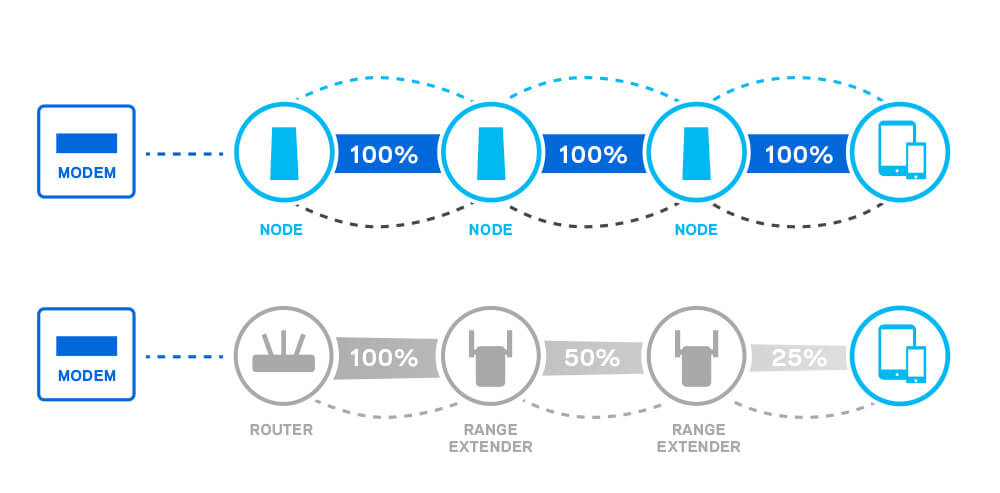
Mesh WiFi is a system made of multiple devices called nodes or satellites. One node connects to your modem, and the rest spread around your home. All nodes communicate with each other, creating one large, seamless network.
For example, if you have a mesh system with three nodes, you can place one near your router, one in the living room, and one in the upstairs hallway. Your devices automatically connect to the strongest node as you move around.
What Is A Wifi Extender?
A WiFi extender (also called a repeater or booster) connects to your existing wireless network and rebroadcasts it to cover more space. It acts like a relay, taking the signal from your main router and sending it further.
For example, if your router is in the office and your bedroom gets weak signal, you can place an extender halfway between. Devices near the extender connect to its signal instead of the weak one from the main router.
How They Work: Key Differences
To make an informed choice, you need to see how each technology works behind the scenes.
Network Structure
- Mesh WiFi: All nodes form a single, unified network with the same name (SSID) and password. Devices switch automatically to the best node.
- WiFi Extender: Creates a separate network (often with “EXT” or similar in its name). Devices may not switch automatically, so you might need to manually select the best network as you move.
Signal Strength
- Mesh WiFi: Maintains strong, consistent signal throughout, as nodes communicate with each other and balance traffic.
- WiFi Extender: Signal can drop or slow down, especially if the extender is far from the main router or if it’s repeating a weak signal.
Speed And Performance
- Mesh WiFi: Typically uses dedicated bands for communication between nodes (backhaul), keeping speeds high for your devices.
- WiFi Extender: Often halves the available bandwidth, since it uses the same channel to receive and send data.
Coverage Comparison
One of the biggest reasons people look for these solutions is to get rid of WiFi dead zones. Let’s compare their coverage abilities.
- Mesh WiFi: Designed for whole-home coverage. Each added node increases the area covered. For example, a 3-node system can cover 4,000–6,000 square feet.
- WiFi Extender: Covers a smaller extra area (usually 800–1,500 square feet per extender), depending on walls and distance from the main router.
Insight: Many people make the mistake of placing extenders too far from the main router. If the extender picks up a weak signal, it rebroadcasts a weak signal—so placement is critical.
Speed And Bandwidth
Speed is crucial, especially for streaming, gaming, and video calls.
| Feature | Mesh WiFi | WiFi Extender |
|---|---|---|
| Top Speed (theoretical) | Up to 3 Gbps (tri-band) | Up to 1.2 Gbps (dual-band) |
| Bandwidth Loss | Minimal (dedicated backhaul) | Up to 50% loss (shared channel) |
| Support for Multiple Devices | Excellent (load balancing) | Limited (can slow down) |
A common beginner mistake: If you have many smart devices, TVs, and laptops, an extender may cause slowdowns. Mesh systems handle many devices better.
Credit: en.elfcams.com
Setup And Ease Of Use
Setting up your network should not be a headache. Here’s how both options compare.
Mesh Wifi
- Most brands offer a simple app-guided setup.
- Add new nodes in minutes by plugging them in and following app instructions.
- Updates and security patches are often automatic.
Wifi Extender
- Usually requires logging into a web interface.
- Placement can be tricky (must be in range of main router).
- Each extender may need separate setup.
Non-obvious insight: Mesh systems let you manage parental controls, guest networks, and device priorities from one place—extenders usually do not.
Cost Comparison
Price is often a deciding factor. Let’s look at the cost ranges and what you get for your money.
| System Type | Average Cost (USD) | What You Get |
|---|---|---|
| Mesh WiFi (2-3 nodes) | $200–$500 | Whole-home coverage, advanced features |
| WiFi Extender (single unit) | $25–$120 | Coverage boost for small area |
Mesh WiFi is more expensive, but you’re buying a whole system. Extenders are cheaper upfront, but adding multiple can quickly raise the total cost.
Reliability And Roaming
Reliable internet means you can walk around the house without interruption. Here’s how both options perform:
- Mesh WiFi: Devices switch seamlessly between nodes (roaming). No need to reconnect or manually change networks. Great for large homes or offices.
- WiFi Extender: Devices may stick to the weaker signal and not switch automatically. This can cause slowdowns or dropped connections.
Pro tip: If you use video calls or smart home devices, mesh systems provide a smoother experience as you move from room to room.
Security Features
Both systems can offer security, but mesh WiFi systems often include more advanced options.
- Mesh WiFi: Built-in firewalls, automatic security updates, parental controls, guest networks, and sometimes malware blocking.
- WiFi Extender: Usually offers basic WPA2 encryption, but rarely advanced options.
If online safety and control are important to you, mesh WiFi is the stronger choice.
Credit: reolink.com
When To Choose Mesh Wifi
Mesh WiFi is the best fit if:
- You have a large home (over 2,500 sq ft) or multiple floors.
- There are thick walls or unusual layouts causing dead zones.
- You want simple management from a single app.
- Your household has many devices (smart TVs, phones, tablets, cameras).
- You need advanced features like parental controls or guest access.
Real-world example: A family with a 4-bedroom house and a basement home office struggled with weak WiFi in several rooms. Switching to a mesh system eliminated all dead zones, and everyone could stream, work, and play games without lag.
When To Choose A Wifi Extender
A WiFi extender is a good fit if:
- Your home is small or medium-sized (under 2,000 sq ft).
- You only have one or two dead zones.
- You want a cheap, quick fix without replacing your router.
- You do not need advanced features or seamless roaming.
Real-world example: A small apartment had a weak signal in the bedroom due to thick walls. A single extender boosted the signal enough for smooth streaming and browsing.
Common Misconceptions
Many people believe adding an extender will always fix slow WiFi. In reality, extenders can make things worse if:
- Placed too far from the main router (rebroadcasting a weak signal).
- Used in homes with many devices (network slows down).
- Multiple extenders are added without careful planning (interference).
Another mistake: Buying a mesh system for a tiny apartment. In small spaces, a single router or a basic extender is often enough.
Real-world Performance: Speed Test Example
Imagine a two-story home, 3,000 square feet:
- Router only: 100 Mbps in the same room, drops to 10 Mbps upstairs.
- With WiFi extender: 100 Mbps near the router, 30 Mbps near the extender, 5 Mbps in far rooms.
- With mesh WiFi: 100 Mbps throughout most of the house, 80 Mbps even in far rooms.
This shows that mesh WiFi maintains strong speeds everywhere, while extenders create “islands” of good signal.
Future-proofing Your Network
With more smart home devices and faster internet plans, future-proofing matters. Mesh WiFi systems are easier to upgrade:
- Add more nodes as your needs grow.
- Get software updates for new features.
- Support for WiFi 6 (and soon WiFi 7) for even better speeds and device handling.
Extenders may need full replacement to keep up with new standards.
Environmental Factors And Placement
Both solutions are affected by:
- Walls and floors: Concrete and brick block signals more than wood or drywall.
- Interference: Microwaves, cordless phones, and neighbors’ WiFi can cause problems.
- Distance: The further from the main router, the weaker the signal.
Placement tip: For both systems, keep devices high on shelves and away from metal objects or electronics.

Credit: www.vsolcn.com
Pros And Cons Summary
Here’s a quick summary to help you decide:
| System | Pros | Cons |
|---|---|---|
| Mesh WiFi | – Seamless coverage – Easy management – Handles many devices – Advanced features | – Higher cost – More setup time – Overkill for small spaces |
| WiFi Extender | – Low cost – Simple add-on – Good for small areas | – Can slow network – No seamless roaming – Limited features |
Final Recommendation
For most large homes, families, or anyone wanting reliable, high-speed internet in every corner, mesh WiFi is the top choice. It’s a long-term investment, easy to expand, and keeps up with modern demands.
If your home is small, your budget is tight, or you just have one stubborn dead zone, a WiFi extender may solve your problem quickly and cheaply.
Always place devices carefully, keep software updated, and don’t expect miracles from the cheapest solution. For more technical details, you can check resources like PCMag’s guide.
Frequently Asked Questions
What Is The Main Difference Between Mesh Wifi And Wifi Extenders?
The main difference is that mesh WiFi uses multiple connected nodes to create one seamless network, while WiFi extenders simply rebroadcast your router’s signal to a new area, often creating a second network.
Will A Wifi Extender Slow Down My Internet Speed?
Yes, most extenders reduce your bandwidth, sometimes by up to 50%. This happens because they use the same channel to receive and send data.
Can I Use Both A Mesh System And Wifi Extenders Together?
Technically, you can, but it’s not recommended. Mixing systems can cause interference and connection problems. Mesh WiFi alone is usually enough if placed correctly.
How Many Mesh Nodes Do I Need For My Home?
Most homes under 3,000 sq ft need 2–3 nodes. Larger homes or those with thick walls may need 4 or more. Always follow the manufacturer’s guidelines.
Are Mesh Wifi Systems Hard To Install?
No, most mesh systems are designed for easy setup. You usually use a smartphone app to guide you, and each new node is added with a few taps.
With this knowledge, you can choose the right solution and enjoy fast, reliable WiFi everywhere you need it.
For more helpful guides, check out new smart home devices worth checking, smart bulb vs normal LED bulb comparison, and energy monitoring smart plug benefits.
Related: fixing common issues with smart light connections
A mesh WiFi system uses multiple nodes that communicate with each other to create a single seamless network. A WiFi extender rebroadcasts your existing router’s signal but creates a separate network with a different SSID.
Mesh WiFi provides superior performance, seamless roaming between nodes, and better coverage uniformity. Extenders are cheaper but can reduce bandwidth by up to 50% and cause connectivity issues when moving between networks.
Quality mesh systems use a dedicated backhaul channel between nodes to minimize speed loss. On tri-band mesh systems, one band is reserved for node-to-node communication, maintaining near-full speeds throughout the network.
A two-node system covers most homes up to 3,000 sq ft. Add a third node for larger homes, homes with thick concrete walls, or multi-story properties. Each additional node extends coverage by roughly 1,000–1,500 sq ft.
Most mesh systems can work in bridge mode alongside an existing router. However, for best performance, replace the existing router with the mesh system’s primary node to avoid double NAT issues and ensure optimal routing.
